---
title: Using RedPitaya as Gain/Phase/Impedance Analyser
description: This article is about how to use Red Pitaya as a gain/phase/impedance analyser.
image: https://content.redpitaya.com/hubfs/G_P_setup-609x287-png.png
---
[](https://redpitaya.com/)
[](https://redpitaya.com/)
- Products
- [STEMlab 125-14 Gen 2](https://redpitaya.com/stemlab-125-14-gen2/)
- [STEMlab 125-14](https://redpitaya.com/stemlab-125-14/)
- [SIGNALlab 250-12](https://redpitaya.com/signallab-250-12/)
- [SDRlab 122-16](https://redpitaya.com/sdrlab-122-16/)
- [STEMlab TI (Texas Instruments)](https://redpitaya.com/stemlab-ti-texas-instruments/)
- [Multi-channel Solutions](https://redpitaya.com/multi-channel-solutions/)
- [Accessories](https://redpitaya.com/accessories/)
- [Applications](https://redpitaya.com/applications/)
- Documentation
- [Technical Documentation](https://redpitaya.com/documentation/)
- [Teaching materials](https://redpitaya.com/teaching-materials/)
- [Student projects](https://redpitaya.com/student-projects/)
- [User forum](https://forum.redpitaya.com/)
- [About](https://redpitaya.com/about-us/)
- [History](https://redpitaya.com/history/)
- [Distributors](https://redpitaya.com/distibutors-red-pitaya/)
- [Blog](https://content.redpitaya.com/blog)
[Shop](https://redpitaya.com/shop/)
- [ACADEMIA](https://redpitaya.com/academia/)
- [RADIO AMATEURS](https://redpitaya.com/radio-amateurs/)
- [Home](https://redpitaya.com/)
- Products
- [STEMlab 125-10](https://redpitaya.com/stemlab-125-10/)
- [STEMlab 125-14](https://redpitaya.com/stemlab-125-14/)
- [SIGNALlab 250-12](https://redpitaya.com/signallab-250-12/)
- [SDRlab 122-16](https://redpitaya.com/sdrlab-122-16/)
- [Accessories](https://redpitaya.com/accessories/)
- [Applications](https://redpitaya.com/applications/)
- [Resources](https://redpitaya.com/documentation/)
- [Shop](https://redpitaya.com/shop/)
- [About](https://redpitaya.com/about-us/)
- [Blog](https://content.redpitaya.com/blog)
- [Compare](https://redpitaya.com/compare/)
- [Login / Register](https://redpitaya.com/my-account/)
### Red Pitaya Blog
[Home](https://redpitaya.com) » [Academia](https://content.redpitaya.com/blog/tag/academia), [Case study](https://content.redpitaya.com/blog/tag/case-study) »
[Academia](https://content.redpitaya.com/blog/tag/academia), [Case study](https://content.redpitaya.com/blog/tag/case-study)
# Using RedPitaya as Gain/Phase/Impedance Analyser
- Posted by  [Red Pitaya Technical Editorial Team](https://redpitaya.com/Red-Pitaya-Blog-team/) , July 1, 2020
From Oscilloscope to Signal Generator… It’s just incredible how many things you can do with Red Pitaya. This time we used it as a **Gain/Phase Analyser.**
**Gain/Phase Analyser**
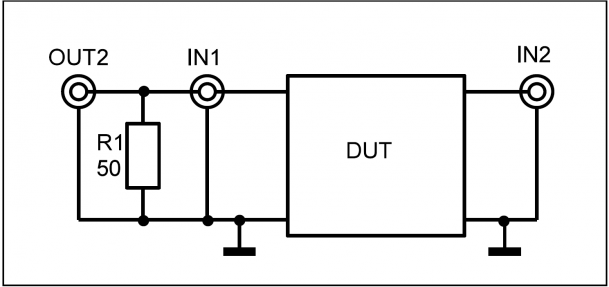
Using one Resistor R1 for proper loading of the signal generator the RedPitaya can be used as a gain/phase analyser to measure gain and phase in the frequency range from 1 kHz to 50 MHz of twoport devices as shown in the following figure:

The signal is generated using fpga-awg signal-generator functionality. The input voltage and output voltage of the ”Device Under Test DUT” are captured with 16384 samples using the fpga-osc osciloscope-trace-capture functionality. Since both voltages are sampled synchronously the phase between the two voltages can be computed. Amplitude and phase of each trace are evaluated by a ”Least Squares” estimation.
The following picture shows the gain (upper red trace) and phase (lower blue trace) of a low-pass filter built with an op-amp. (Upper blue trace shows DUT input voltage.)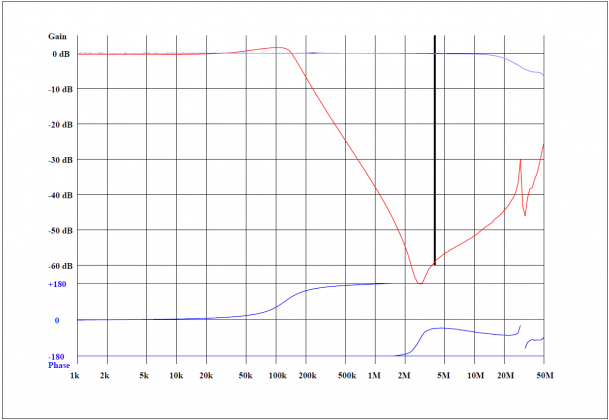
The following picture shows the phase and gain of a 10.7 MHz quartz crystal filter using a 100 kHz sweep span. A dynamic range of 50 to 60dB seems attainable using the RedPitaya.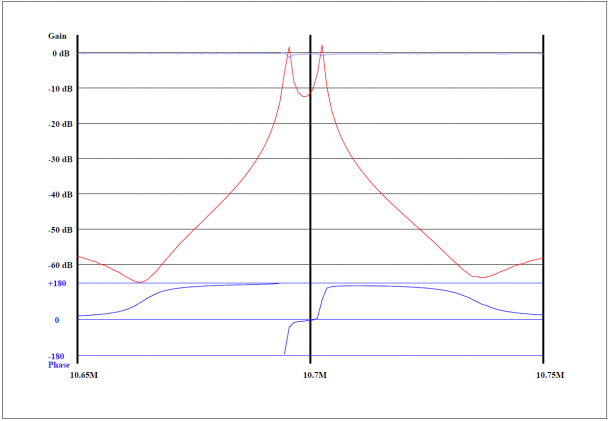
**Impedance Analyser**
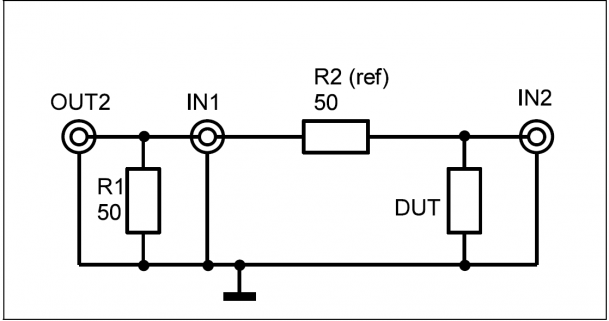
Using R1 for proper loading and R2 as a shunt for current measurement, the impedance of a device DUT can be measured using the RedPitaya in the range from
1 kHz to 50 MHz. Voltage and current for the device are measured in the same way as for the gain/phase analyser.
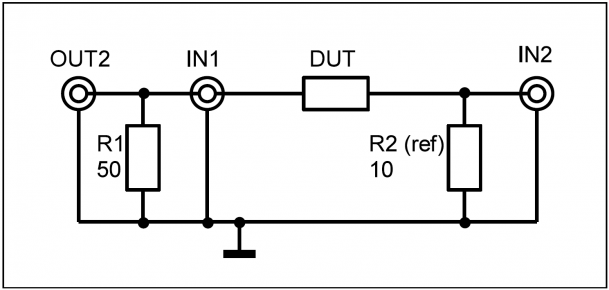
The various describing parameters of an impedance can be displayed:
Series circuit: *Z* = *R* + *jX* or series inductance *Ls* or series capacitance *Cs*
Paralell circuit: *Lp Rp* and *Cp*
Also possible is printout of modulus of impedance, angle of impedance and quality factor Q.
The following listing shows the protocol of the measurement of a coil with an inductance of about 850uH with high quality factor.
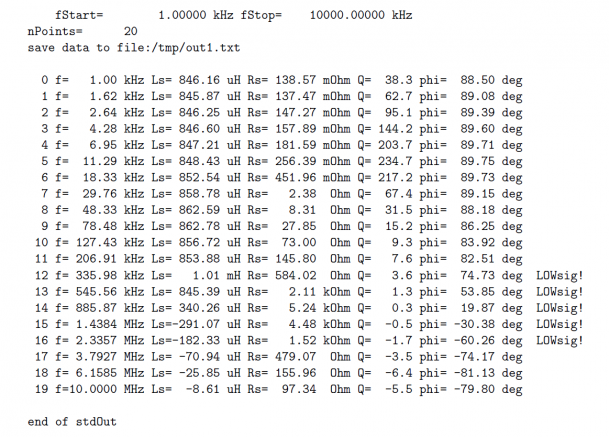
Above 1 MHz the measured inductance is negative, due to the fact that the inductance has its resonance frequency somewhere in the region of 1 MHz. In the region of some hundred kHz the current is too small for a reliable measurement, indicated by ”LOWsig”, since the impedance of the inductor is rather large there. A larger shunt could be used here.
lowdut option:
In order to measure small impedances the ‘lowdut’ option can be used. Cabling is shown in the following diagram. This time the DUT forms the lower component of the voltage divider.
Options for gain/phase/impedance analyser software.
start-frequency and stop-frequency
alternatively: center-frequency and span
log or lin sweep
number of points
value of shunt resistance
parameters to print: Z,X,Rs,Ls,Cs,Rp,Lp,Cp,Q,phi,gain
lowdut option
Software is written in C.
### About the Red Pitaya Team
The Red Pitaya Technical Editorial Team is a cross-functional group of technical communicators and product specialists. By synthesizing insights from our hardware developers and global research partners, we provide verified, high-value content that bridges the gap between open-source innovation and industrial-grade precision.
Our mission is to make advanced instrumentation accessible to engineers, researchers, and educators worldwide.
##### Categories
- [academia (47)](https://content.redpitaya.com/blog/tag/academia)
##### Recent Posts
- [](https://content.redpitaya.com/blog/experimenting-with-red-pitaya-stemlab-gen-2-book)
[What’s Inside Experimenting with Red Pitaya STEMlab Gen 2?](https://content.redpitaya.com/blog/experimenting-with-red-pitaya-stemlab-gen-2-book)
October 20, 2026
- [](https://content.redpitaya.com/blog/red-pitaya-input-impedance-50-ohm-high-z)
[Why Is My Signal Voltage Doubled? Understanding Red Pitaya Input Impedance & 50 ΩTermination](https://content.redpitaya.com/blog/red-pitaya-input-impedance-50-ohm-high-z)
October 12, 2026
- [](https://content.redpitaya.com/blog/red-pitaya-copilot-instrument-development)
[Red Pitaya Copilot: How to Build Custom FPGA Instruments with AI Assistance](https://content.redpitaya.com/blog/red-pitaya-copilot-instrument-development)
October 12, 2026
##### Subscribe to our newsletter

An open-source solution for hobbyists, professors,
radio amateurs and industrial clients.
**Red Pitaya**
Velika pot 21,
5250 Solkan
Slovenia, Europe
Phone: +386 30 322 719
Email: [info@redpitaya.com](mailto:info@redpitaya.com)
**Red Pitaya US**
TX, Dallas - Downtown Republic Center
325 N. St. Paul Street
Suite 3100
Dallas, Texas, 75202
United States of America
IMPORTANT: This address does not accept RMAs
Phone: (888) 637-2706
Email: [US.office@redpitaya.com](mailto:US.office@redpitaya.com)
- Customer Service
- [Customer Support](https://redpitaya.com/customer-support/)
- [Shipping & Returns](https://redpitaya.com/shipping-returns/)
- [Contact us](https://redpitaya.com/contact-us/)
- [Cookie Policy](https://redpitaya.com/cookie-policy/)
- SLO
- [O nas](https://redpitaya.com/o-nas/)
- [Pogoji poslovanja](https://redpitaya.com/pogoji-poslovanja/)
- [Politika zasebnosti](https://redpitaya.com/politika-zasebnosti/)
- [Politika piškotkov](https://redpitaya.com/politika-piskotkov/)
##### Follow Us
#### Subscribe to our newsletter
Get notified about new SW features & updates, news about latest community projects & events and new Red Pitaya products & discounts
[Subscribe](https://go.redpitaya.com/cs/c/?cta_guid=36ccbdc0-0344-49c4-aa91-aa67cf437c09&signature=AAH58kHkxFYTAKU-ILQzHI1jlrdI_co0RA&placement_guid=a24cb732-1dfb-4d0a-8c52-aa6851ce9102&click=556cfaee-eee4-48e4-95e7-c483a4f78883&hsutk=537e15e740555d2fd6a1c1ad931d2b6f&canon=https%3A%2F%2Fredpitaya.com%2Fabout-us%2F&utm_referrer=https%3A%2F%2Fredpitaya.com%2Fcompare%2F&portal_id=7715357&redirect_url=APefjpGj5Dm9poAAzHFGh4S6pJ-2TvNzBdwZZlfbr7toxfw-epFUtzEHOKToHx0i2TYYr39srj9aSERdntJBh8lJqoSXL-pUF2gwhYvOW6IMm28hQVmhYML2AIbbIRrr3YaoyJkZQ0iRxq-uHlFt66i3_8XpQpXT_M2zF9fS7t0f6hlBjGBJ7X_aXDrhBwXcEAqwoWWleG4uxonSGOR-BBp3tpKcySXYELTGHeGn5Yo61r3xrFvqFP5P6BxVwxTi51_ceW9uBzOMvA1rYz4BsIhLSF8n4bhcHqJTvhibH_laJrjDNdEUUrU&__hstc=72355340.537e15e740555d2fd6a1c1ad931d2b6f.1635738083317.1635738083317.1635746314170.2&__hssc=72355340.5.1635746314170&__hsfp=530052575&contentType=standard-page)
**Red Pitaya** 2025 All Rights Reserved.
- [Privacy Policy](https://redpitaya.com/privacy-policy/)
- [Terms of Use](https://redpitaya.com/terms-of-use/)
```json
{
"@context" : "https://schema.org",
"@type" : "BlogPosting",
"author" : {
"@type" : "Person",
"name" : "Red Pitaya Technical Editorial Team",
"url" : "https://content.redpitaya.com/blog/author/red-pitaya-technical-editorial-team"
},
"dateModified" : "2022-01-07T08:27:28.189Z",
"datePublished" : "2020-07-01T11:59:00.000Z",
"headline" : "Using RedPitaya as Gain/Phase/Impedance Analyser",
"image" : [ "https://content.redpitaya.com/hubfs/G_P_setup-609x287-png.png" ],
"mainEntityOfPage" : {
"@id" : "https://content.redpitaya.com/blog/using-redpitaya-as-gain/phase/impedance-analyser",
"@type" : "WebPage"
},
"publisher" : {
"@type" : "Organization",
"logo" : {
"@type" : "ImageObject",
"url" : "https://content.redpitaya.com/hubfs/Red-pitaya-logo.jpg"
},
"name" : "Red Pitaya d.o.o."
}
}
```