---
title: Open Source Quantum Experiment Control with OpenLabCtrl
description: Discover how OpenLabCtrl democratizes quantum experiment control with an open-source, FPGA-based framework, bridging the performance gap for researchers.
image: https://content.redpitaya.com/hubfs/blog%20featured%20image%20-%202026-06-29T073728.731.jpg
---
[](https://redpitaya.com/)
[](https://redpitaya.com/)
- Products
- [STEMlab 125-14 Gen 2](https://redpitaya.com/stemlab-125-14-gen2/)
- [STEMlab 125-14](https://redpitaya.com/stemlab-125-14/)
- [SIGNALlab 250-12](https://redpitaya.com/signallab-250-12/)
- [SDRlab 122-16](https://redpitaya.com/sdrlab-122-16/)
- [STEMlab TI (Texas Instruments)](https://redpitaya.com/stemlab-ti-texas-instruments/)
- [Multi-channel Solutions](https://redpitaya.com/multi-channel-solutions/)
- [Accessories](https://redpitaya.com/accessories/)
- [Applications](https://redpitaya.com/applications/)
- Documentation
- [Technical Documentation](https://redpitaya.com/documentation/)
- [Teaching materials](https://redpitaya.com/teaching-materials/)
- [Student projects](https://redpitaya.com/student-projects/)
- [User forum](https://forum.redpitaya.com/)
- [About](https://redpitaya.com/about-us/)
- [History](https://redpitaya.com/history/)
- [Distributors](https://redpitaya.com/distibutors-red-pitaya/)
- [Blog](https://content.redpitaya.com/blog)
[Shop](https://redpitaya.com/shop/)
- [ACADEMIA](https://redpitaya.com/academia/)
- [RADIO AMATEURS](https://redpitaya.com/radio-amateurs/)
- [Home](https://redpitaya.com/)
- Products
- [STEMlab 125-10](https://redpitaya.com/stemlab-125-10/)
- [STEMlab 125-14](https://redpitaya.com/stemlab-125-14/)
- [SIGNALlab 250-12](https://redpitaya.com/signallab-250-12/)
- [SDRlab 122-16](https://redpitaya.com/sdrlab-122-16/)
- [Accessories](https://redpitaya.com/accessories/)
- [Applications](https://redpitaya.com/applications/)
- [Resources](https://redpitaya.com/documentation/)
- [Shop](https://redpitaya.com/shop/)
- [About](https://redpitaya.com/about-us/)
- [Blog](https://content.redpitaya.com/blog)
- [Compare](https://redpitaya.com/compare/)
- [Login / Register](https://redpitaya.com/my-account/)
### Red Pitaya Blog
[Home](https://redpitaya.com) » [Blog](https://content.redpitaya.com/blog/tag/blog) »
[Blog](https://content.redpitaya.com/blog/tag/blog)
# Open Source Quantum Experiment Control with OpenLabCtrl
- Posted by  [Red Pitaya Technical Editorial Team](https://redpitaya.com/Red-Pitaya-Blog-team/) , June 24, 2026

Reports from the [World Economic Forum](https://reports.weforum.org/docs/WEF_Embracing_the_Quantum_Economy_2024.pdf) (WEF) and [Plug and Play](https://welcome.plugandplaytechcenter.com/quantum-tech-report-2025) warn that as quantum technology progresses, we risk a **"quantum divide."** They explain that high R&D costs and a shortage of skilled workers threaten to leave many research organizations behind.
We recognised that most quantum experiments don’t require the expensive GHz bandwidth or sub-nanosecond precision that are standard in the current market.
### **Bridging the Medium-Performance Gap**
OpenLabCtrl was developed to address this gap by providing a fully open-source, FPGA-based control framework optimized for medium-performance experimental applications. Running on a low-cost, off-the-shelf **Red Pitaya STEMlab 125-14** board, the solution provides deterministic control of its analogue and digital IOs with a **timing resolution of 8 ns**.
The digital interfaces can be dynamically repurposed for serial communication protocols such as **SPI and UART**, enabling uninterrupted integration with external lab peripherals and legacy instrumentation.
## **FPGA / Firmware Architecture**
The Red Pitaya STEMlab 125-14 is built around the AMD Xilinx Zynq-7010 (or Zynq-7020 in upgraded variants) SoC, pairing a dual-core ARM Cortex-A9 processor (Processing System, PS) and programmable logic fabric (PL) on a single die.
- **The Processing System (PS):** Runs a lightweight TCP server that communicates with your host PC over Ethernet and exposes the native Python API interface.
- **The Programmable Logic (PL):** Houses a high-speed DMA engine that bridges the PS RAM directly with the FPGA fabric, transferring instruction sequences and acquisition data without processing intervention.
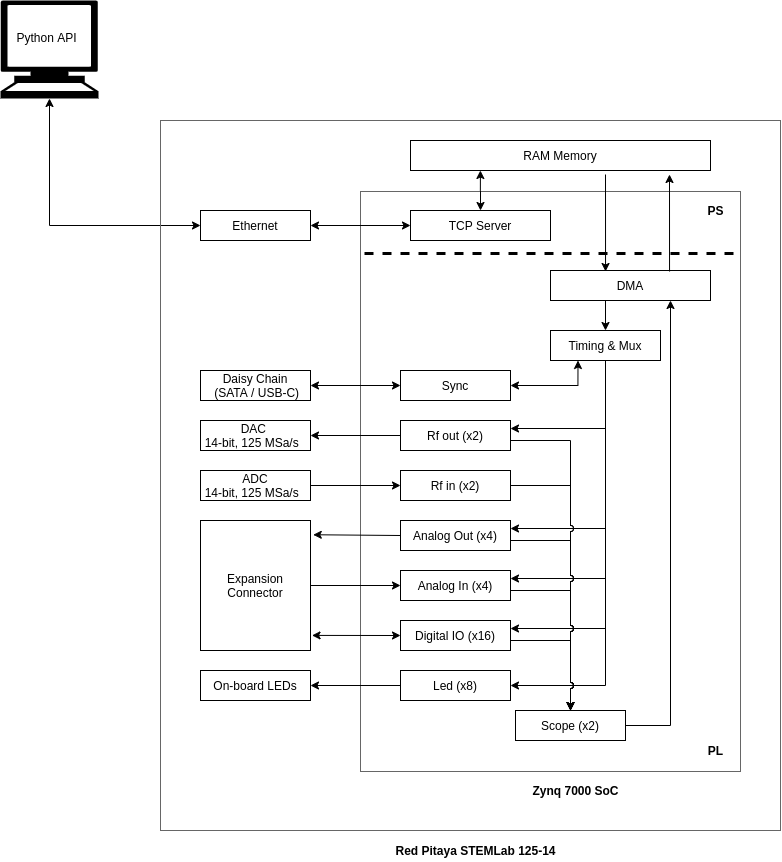
*High-level FPGA architecture of the OpenLabCtrl project. The Zynq 7000 SoC is divided into a Processing System (PS) running the TCP server and a Programmable Logic fabric (PL) implementing the timing engine and all IO peripherals.*
A central **Timing & Mux block** orchestrates the real-time execution of all onboard hardware components:
- **2 RF Outputs:** 14-bit DAC channels operating at 125 MSa/s, supporting analog signal generation with up to 60 MHz of usable bandwidth.
- **2 RF Inputs:** 14-bit ADC channels operating at 125 MSa/s, supporting real-time analog signal acquisition with up to 60 MHz of usable input bandwidth.
- **16 Digital IOs:** Fully customizable instrumentation gates.
- **4 Auxiliary Analog Outputs:** Low-pass filtered PWM channels.
- **4 Auxiliary Analog Inputs:** XADC channels featuring 12-bit resolution running at **250 KSa/s**.
- **8 On-board LEDs:** For real-time visual status verification.
- **2 Internal Scopes:** Dedicated hardware blocks for internal data acquisition and signal monitoring.
Multi-board scalability is managed by a hardware **Sync module** that interfaces directly with the board's daisy-chain connectors (SATA / USB-C), enforcing deterministic phase and timing re-synchronization across multiple units.
## **Software / API Architecture**
On the software side, experimental sequences are broken down into modular execution units referred to as IoSyncFrames and ParameterizedIoSyncFrames.
Each frame contains an independent set of hardware operations—such as setting digital outputs, configuring RF frequencies, sweeping amplitudes, or inserting precise delays—which the framework automatically compiles into low-level FPGA instructions.
These abstractions enable researchers to write reusable sequence definitions and parameterized execution loops entirely in Python, **completely eliminating the need for complex, time-consuming FPGA recompilation** during iterative experimental runs.
Figure 2 illustrates a representative multi-board sequence: three Red Pitaya boards execute independent IoSyncFrame blocks in parallel, with two global RSYNC barriers enforcing deterministic re-synchronization across all boards between execution stages.
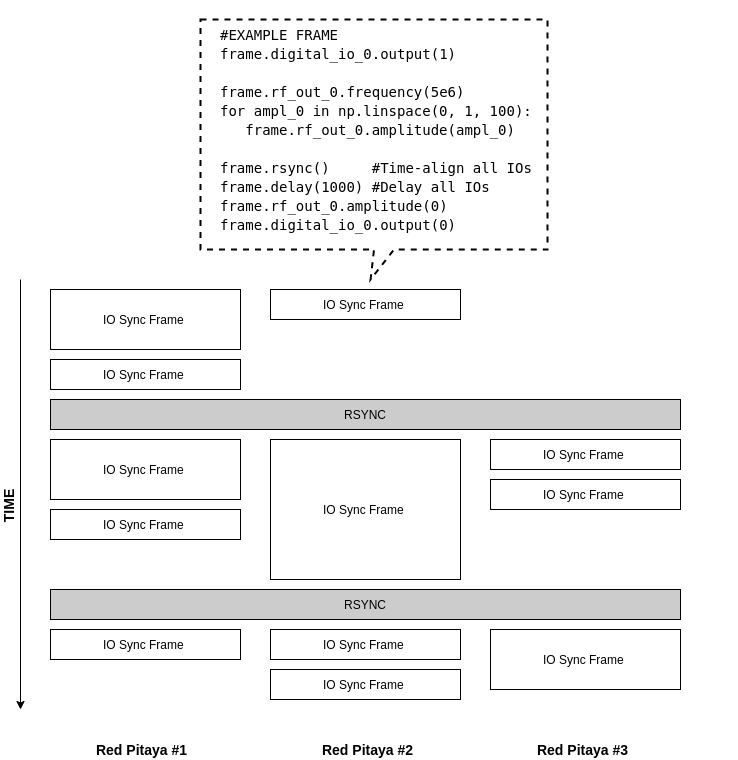

*Top: example IoSyncFrame definition in Python. Bottom: timing diagram of a three-board sequence, showing independent IoSyncFrame blocks executing on each Red Pitaya and two RSYNC barriers that realign all boards before the next stage proceeds.*
## How can I get started with OpenLabCtrl?
The OpenLabCtrl software is fully open-source and available to get started right now. To help quantum research groups get their pilots up and running quickly, we are opening applications for our **Early Access Program** - whether you already own a Red Pitaya or not!
As a participant, you will have direct communication with us. We want to hear how the tool actually performs on your benches and learn from your specific experimental setups. In exchange for early access to the hardware and optimization advice, your feedback will directly shape the future of the tool and help us decide which features to build next.
[APPLY HERE to the Early Access program](https://redpitaya.com/open-lab-control/)
and become a part of Open Lab Control development!
## FAQ:
### **What performance specifications does it deliver?**
OpenLabCtrl is optimized for medium-performance quantum experiments. It provides deterministic control of the board's analogue and digital IOs with a strict timing resolution of 8 ns. A single board orchestrates two fast RF outputs (125 MSa/s), two fast RF inputs (125 MSa/s), 16 digital IOs, plus multiple slow analog inputs and outputs.
### **How do I program my experimental sequences?**
You control everything through a flexible Python API. The software breaks experimental sequences down into modular blocks called IoSyncFrames. This allows you to build reusable sequence definitions and drastically cuts down on recompilation times when you are running iterative experiments. We also provide ready-to-use Jupyter notebook examples to guide you through different use cases.
### **Which specific hardware models are supported?**
The framework is built specifically for the Red Pitaya STEMlab 125-14. This includes the [Original Gen](https://redpitaya.com/stemlab-125-14), [Original Gen Low Noise](https://redpitaya.com/product/stemlab-125-14-low-noise-starter-kit), [Gen 2, and Gen 2 PRO](https://redpitaya.com/stemlab-125-14-gen2/) models. If your lab does not currently own one, you can apply for a Hardware Evaluation Unit through Track 2 of our program to test it out completely risk-free.
### About the Red Pitaya Team
The Red Pitaya Technical Editorial Team is a cross-functional group of technical communicators and product specialists. By synthesizing insights from our hardware developers and global research partners, we provide verified, high-value content that bridges the gap between open-source innovation and industrial-grade precision.
Our mission is to make advanced instrumentation accessible to engineers, researchers, and educators worldwide.
##### Categories
- [academia (47)](https://content.redpitaya.com/blog/tag/academia)
##### Recent Posts
- [](https://content.redpitaya.com/blog/experimenting-with-red-pitaya-stemlab-gen-2-book)
[What’s Inside Experimenting with Red Pitaya STEMlab Gen 2?](https://content.redpitaya.com/blog/experimenting-with-red-pitaya-stemlab-gen-2-book)
October 20, 2026
- [](https://content.redpitaya.com/blog/red-pitaya-input-impedance-50-ohm-high-z)
[Why Is My Signal Voltage Doubled? Understanding Red Pitaya Input Impedance & 50 ΩTermination](https://content.redpitaya.com/blog/red-pitaya-input-impedance-50-ohm-high-z)
October 12, 2026
- [](https://content.redpitaya.com/blog/red-pitaya-copilot-instrument-development)
[Red Pitaya Copilot: How to Build Custom FPGA Instruments with AI Assistance](https://content.redpitaya.com/blog/red-pitaya-copilot-instrument-development)
October 12, 2026
##### Subscribe to our newsletter

An open-source solution for hobbyists, professors,
radio amateurs and industrial clients.
**Red Pitaya**
Velika pot 21,
5250 Solkan
Slovenia, Europe
Phone: +386 30 322 719
Email: [info@redpitaya.com](mailto:info@redpitaya.com)
**Red Pitaya US**
TX, Dallas - Downtown Republic Center
325 N. St. Paul Street
Suite 3100
Dallas, Texas, 75202
United States of America
IMPORTANT: This address does not accept RMAs
Phone: (888) 637-2706
Email: [US.office@redpitaya.com](mailto:US.office@redpitaya.com)
- Customer Service
- [Customer Support](https://redpitaya.com/customer-support/)
- [Shipping & Returns](https://redpitaya.com/shipping-returns/)
- [Contact us](https://redpitaya.com/contact-us/)
- [Cookie Policy](https://redpitaya.com/cookie-policy/)
- SLO
- [O nas](https://redpitaya.com/o-nas/)
- [Pogoji poslovanja](https://redpitaya.com/pogoji-poslovanja/)
- [Politika zasebnosti](https://redpitaya.com/politika-zasebnosti/)
- [Politika piškotkov](https://redpitaya.com/politika-piskotkov/)
##### Follow Us
#### Subscribe to our newsletter
Get notified about new SW features & updates, news about latest community projects & events and new Red Pitaya products & discounts
[Subscribe](https://go.redpitaya.com/cs/c/?cta_guid=36ccbdc0-0344-49c4-aa91-aa67cf437c09&signature=AAH58kHkxFYTAKU-ILQzHI1jlrdI_co0RA&placement_guid=a24cb732-1dfb-4d0a-8c52-aa6851ce9102&click=556cfaee-eee4-48e4-95e7-c483a4f78883&hsutk=537e15e740555d2fd6a1c1ad931d2b6f&canon=https%3A%2F%2Fredpitaya.com%2Fabout-us%2F&utm_referrer=https%3A%2F%2Fredpitaya.com%2Fcompare%2F&portal_id=7715357&redirect_url=APefjpGj5Dm9poAAzHFGh4S6pJ-2TvNzBdwZZlfbr7toxfw-epFUtzEHOKToHx0i2TYYr39srj9aSERdntJBh8lJqoSXL-pUF2gwhYvOW6IMm28hQVmhYML2AIbbIRrr3YaoyJkZQ0iRxq-uHlFt66i3_8XpQpXT_M2zF9fS7t0f6hlBjGBJ7X_aXDrhBwXcEAqwoWWleG4uxonSGOR-BBp3tpKcySXYELTGHeGn5Yo61r3xrFvqFP5P6BxVwxTi51_ceW9uBzOMvA1rYz4BsIhLSF8n4bhcHqJTvhibH_laJrjDNdEUUrU&__hstc=72355340.537e15e740555d2fd6a1c1ad931d2b6f.1635738083317.1635738083317.1635746314170.2&__hssc=72355340.5.1635746314170&__hsfp=530052575&contentType=standard-page)
**Red Pitaya** 2025 All Rights Reserved.
- [Privacy Policy](https://redpitaya.com/privacy-policy/)
- [Terms of Use](https://redpitaya.com/terms-of-use/)
```json
{
"@context" : "https://schema.org",
"@type" : "BlogPosting",
"author" : {
"@type" : "Person",
"name" : "Red Pitaya Technical Editorial Team",
"url" : "https://content.redpitaya.com/blog/author/red-pitaya-technical-editorial-team"
},
"dateModified" : "2026-06-29T05:37:56.806Z",
"datePublished" : "2026-06-24T20:21:06.000Z",
"headline" : "Open Source Quantum Experiment Control with OpenLabCtrl",
"image" : [ "https://content.redpitaya.com/hubfs/blog%20featured%20image%20-%202026-06-29T073728.731.jpg" ],
"mainEntityOfPage" : {
"@id" : "https://content.redpitaya.com/blog/democratizing-quantum-experiment-control-with-openlabctrl",
"@type" : "WebPage"
},
"publisher" : {
"@type" : "Organization",
"logo" : {
"@type" : "ImageObject",
"url" : "https://content.redpitaya.com/hubfs/Red-pitaya-logo.jpg"
},
"name" : "Red Pitaya d.o.o."
}
}
```